
Your PDF already is the form—we just make it fillable
Most teams already have the form. The problem is getting it online without rebuilding it from scratch—or asking people to print, sign, and scan their way back to you.
The familiar pain
PDFs are everywhere. Employment applications, statutory declarations, medical intake forms, school enrolment sheets—a lot of them live as PDFs because that's what the official version looks like. That's fine. The problem shows up when someone needs to collect responses.
The usual options aren't great. You can ask people to print, fill by hand, and scan back. Or you can retype the whole layout into a separate form builder, losing the original formatting in the process. Or you can send an editable PDF and hope the recipient has something that opens it properly.
Each of those paths has friction—for the person collecting responses and the person filling it in.
What I kept wishing existed
The document already exists. It already has the right fields, the right clauses, the right layout. What's missing is a way to make it fillable on the web—without redrawing every box by hand—and then to collect the answers and hand back a completed copy that still looks like the original.
That's the idea behind borangDigital. Use the PDF you already have. Let the system find where the blanks are. Publish it. Collect responses. Done.
See it in two minutes
How it works, in plain terms
- Upload your PDF. The form you already use—no redesign needed.
- Spot the fillable areas. The tool finds the blanks, checkboxes, and signature spots. You can nudge anything that's off.
- Share or publish. Send people a link. They fill it in their browser—no app, no printer.
- Collect responses. Submissions are saved in one place so you can review them at any time.
- Download a completed copy. Answers land on the original layout. It still looks like the official document people expect.
For forms that need a signature, the process keeps a clear record of who signed and when—without asking signers to register for anything or go through a complicated verification flow.
The goal is to keep the real document intact. Not a vague "web version" that might drop a line or reorder a clause—the actual PDF, just online.
Who this is actually for
If your team sends PDFs to get information from people, this is for you. In practice that tends to be:
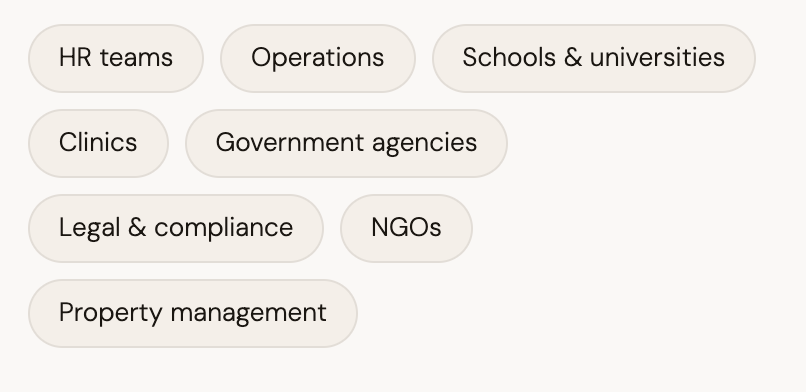
Basically anyone who has a stack of standard PDF forms and still runs them through a print–sign–scan cycle, or who rekeys handwritten answers into a spreadsheet at the end of the day.
What we're building toward
The near-term aim is simple: fewer print–scan cycles and faster turnaround on anything form-related. Longer term, there's more you can do when responses are already structured and linked to the original document—routing, archiving, auditing. But that's not where we start.
We start with the form you already have.
If that sounds like a problem worth solving for your team, take a look at the walkthrough above and see if the workflow fits.